Panels
Main Panel
Main PCV panel is located in 3D Viewport Sidebar N under Point Cloud Visualizer tab. This panel shows active object properties and operators.
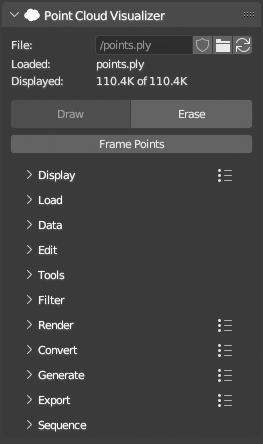
Main Controls
- Choose file clicking browse icon
 and from now on, active object is considered a “PCV Instance”.
  and
and  indicates
 Packflag status. See Preferences for more info. reloads linked file contents.
- Linked file name and number of loaded / displayed points.
DrawandEraseoperators.Drawoperator will also load points if they are not loaded.Erasewill only stop drawing in viewport, loaded points will remain in system memory.Frame Pointswill center points in viewport camera and adjust itsClip Endproperty if needed to show all points.
Tip
When drawing large datasets in dimensions,
Frame Pointswill adjustClip Endso points are visible, but notClip Start, if you find that individual points are flickering while you navigate viewport (caused by floating point precision loss in viewport depth buffer, also called Z-fighting), it can be fixed by settingClip Start(3D Viewport > Sidebar > View tab > View panel) manually to some larger value then default0.01, e.g.1.0or more.
3D Viewport Panel
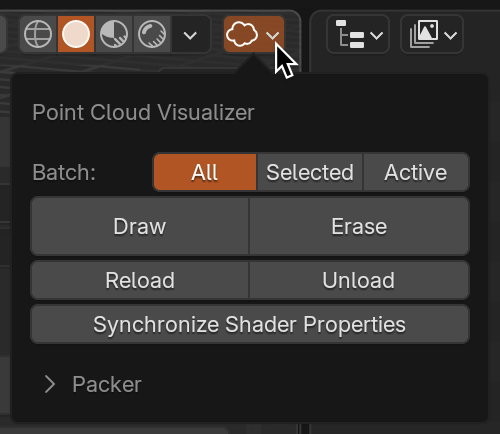
Pop up panel at the top right corner of 3D Viewport header contains actions that can run on multiple PCV instances at the same time, Packer operators that work with current blend file.
Batch Operators
- Run basic loading and drawing operators on every PCV instance that is found in scene and falls under
Influence. It is the same like selecting object by object and clicking operator button. Synchronize Shader Propertieswill copy display properties from active to influenced instance.
Packer
Packeris fully automated storing of loaded points directly in.blendfile as hidden mesh datablocks on.blendfile save and restoring points from stored meshes on.blendfile load. See Preferences for more info.PackandUnpackoperators are run automatically on.blendfile events or can be run manually from here.Optimizewill remove stored meshes if PCV instance is no longer present in.blendfile, this is also automated during packing or can be run manually from here.Clearwill remove all stored meshes.Mark All LoadedandUnmark Allwill setPack flag on all pcv instances in scene.Packed Pointsare will show summary of stored mesh datablocks.