Render
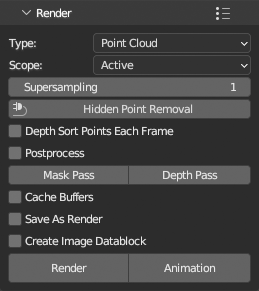
Render with active GPU backend single or multiple PCV instances to image or sequence of images with transparent or 3d viewport background (as looks in Solid viewport shading). Points are always rendered with active shader used for drawing in viewport. Scalars, normals and bounding box is rendered if enabled and drawn in viewport. Clipping planes are used during rendering as well.
Other blender objects can be rendered together with points if Type is Viewport. They will look as in viewport.
Preset  menu in panel header will save all panel settings into a preset.
Output
Images are rendered in Properties > Output Properties > Format Resolution X,Y and % dimensions and saved as set in Properties > Output Properties > Output (image file formats only) at path at the same panel. If Save As Render is enabled, Properties > Output Properties > Output > Color Management is used. Rendered images are directly saved to output directory, they are not opened in image editor area as regular Blender renders, unless Create Image Datablock is enabled, then will render to image datablock (single render, animation is always saved to disk), consecutive renders will create new image datablock each, images have to be saved manualy or packed to blend file.
Performance
Cache Buffers speeds up animation rendering by creating buffers once and reusing for the rest of frames. Works only on static point data (no sequences) and Display properties cannot be animated, Depth Sorting and HPR cannot be used. Only container transformation can be animated.
Anti-aliasing
For anti-aliased images, use Supersampling 2 or larger. At value 2 renders image at 200% size (3 at 300% etc.) and then downsamples to output resolution. This is limited by maximal gpu image (texture) resolution so be careful with value, use the smallest acceptable, usually at 2, amount of anti-aliasing is sufficient.
Look
- If you render points with alpha per point and
Alphashader, or if you use otherGlobal Alphathen 1.0, for best result enableDepth Sort Points Each Framefor correct alpha blending. On the other hand, rendering will be slower because sorting is performed in python and not in gpu. Hidden Point RemovalrunsHidden Point Removalfilter on points on each frame using render camera location.Postprocessapplies postprocesing on renders as in viewport, but adjust setting first for rendering in Render panel. Because of different resolution, result may look different then in viewport.
Other Notes
Mask PassandDepth Passsaves separate files with mask and depth buffer.- If you start Blender from command line you can observe animation rendering progress in terminal.
- If you want to render points with Blender render engine (Cycles, Eevee or any other), points need to be converted to regular Blender object, see
Convertsection.